
WordPress vs. Website Builders: What Should a Small Business Choose?
Every small business needs a professional online presence to attract customers, build trust, and grow its brand. Whether you run a local shop, a consulting business, a restaurant, or an online store, your website can help potential customers discover your services and contact you.
However, choosing the right platform can be confusing. Should you use WordPress or choose a website builder such as Wix or Squarespace?
The answer depends on your budget, technical skills, business goals, and plans for future growth. Both options can help you create a professional website, but they offer different levels of flexibility, customization, and control.
In this guide, we will compare WordPress vs website builders to help you choose the right solution for your small business.
1. What Is WordPress?
WordPress is an open-source content management system (CMS) that allows you to create and manage websites. It supports business websites, blogs, portfolios, membership platforms, and online stores.
With WordPress, you can choose your hosting provider, install themes and plugins, customize your design, and add features as your business grows.
For example, a small business can use Elementor or the WordPress block editor to build landing pages, publish blog articles, create contact forms, and sell products through WooCommerce.
Benefits of WordPress
- Flexible customization: Build a website that matches your brand and business requirements.
- Plugin ecosystem: Add features such as booking forms, SEO tools, analytics, and online payments.
- Content marketing: Publish articles and resources to attract visitors through search engines.
- E-commerce capabilities: Create an online store using WooCommerce.
- Greater hosting choice: Select a hosting provider that suits your requirements.
- Ownership and portability: You generally have more control over your website files and database, subject to your hosting and service arrangements.
WordPress does require maintenance. You need to manage updates, backups, security, and performance, either yourself or with professional assistance.
2. What Are Website Builders?
Website builders are platforms that simplify the process of creating a website. Many offer visual drag-and-drop editors, ready-made templates, hosting, and built-in business tools.
Popular examples include Wix and Squarespace. These services are designed to help users build websites without needing to manage a separate hosting environment.
You can select a template, customize colors and text, upload images, and publish your website through the platform.
Benefits of Website Builders
- Beginner-friendly editing: Create pages using visual tools.
- Quick setup: Start with templates instead of building every page from scratch.
- Managed hosting: Hosting is generally included in the subscription.
- Integrated features: Many platforms provide forms, analytics, and e-commerce tools.
- Less technical maintenance: The platform manages much of the underlying infrastructure.
However, some website builders limit advanced customization, third-party integrations, or the ability to move your entire website to another platform. Available features also depend on the service and subscription plan.
3. WordPress vs. Website Builders: Key Differences
Before selecting a platform, consider how each option performs in the areas that matter most to your business.
| Feature | WordPress | Website Builders |
|---|---|---|
| Ease of use | Moderate learning curve | Usually beginner-friendly |
| Initial setup | Hosting and configuration may be needed | Often guided setup |
| Design flexibility | Extensive customization | Depends on the platform |
| Plugins and integrations | Large plugin ecosystem | Platform-dependent options |
| Hosting | Usually arranged separately for WordPress.org | Usually included |
| Maintenance | Updates and backups require attention | Much is managed by the provider |
| SEO | Flexible tools and configuration | Built-in SEO tools are common |
| E-commerce | WooCommerce and other integrations | Built-in store tools on supported plans |
| Portability | Generally greater control over files and database | Migration options vary |
| Long-term growth | Highly adaptable | Depends on platform capabilities |
Neither option is automatically better for every business. The right choice is the one that meets your current needs without creating unnecessary costs or limitations later.
4. Comparing Platform Flexibility
Flexibility matters when your business needs custom features, advanced integrations, or a unique website design.
The following chart uses illustrative ratings on a scale of 1 to 10. These are editorial estimates, not results from an independent benchmark.
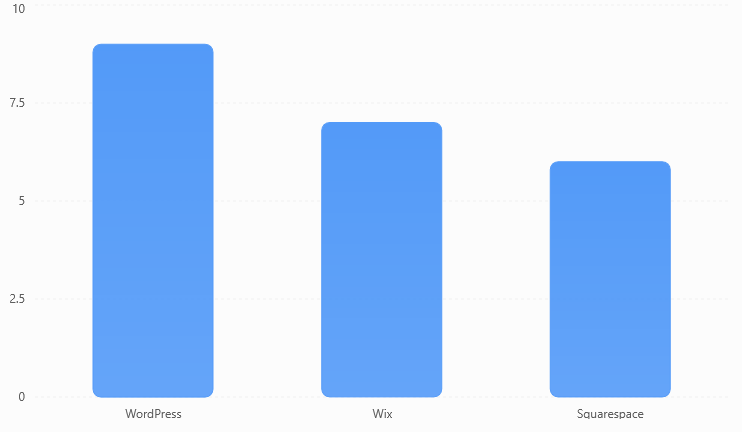
Chart interpretation: WordPress offers extensive flexibility because you can modify themes, use plugins, and work with custom code. Website builders can still support professional websites, but their customization options depend on their available tools and platform restrictions.
Suggested chart caption: WordPress vs. website builders — estimated customization flexibility.
5. Which Platform Is More Affordable?
Budget is an important consideration for small businesses. However, comparing only the initial price can be misleading.
WordPress software is free to download, but you may need to pay for hosting, a domain name, premium themes, plugins, security services, and development work.
Website builders typically charge a subscription fee that bundles hosting and certain features. Premium plans may be necessary for advanced marketing tools, online payments, or additional storage.
Illustrative First-Year Website Costs
The figures below are hypothetical example budgets in US dollars, not live quotes or market averages. Actual costs depend on location, provider, plan, website complexity, and professional services.
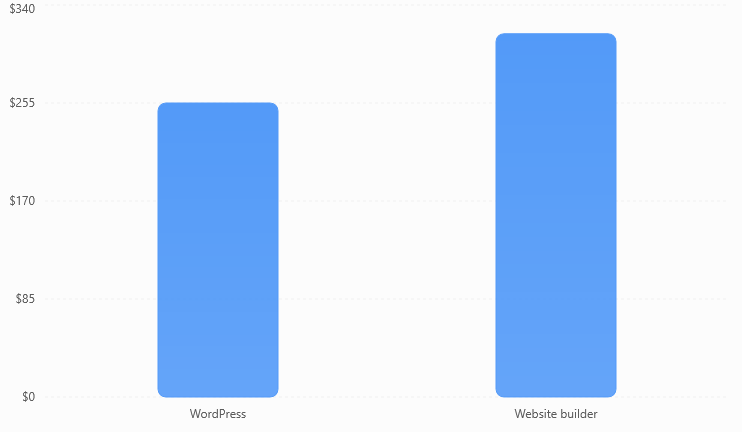
Chart interpretation: In this example, WordPress costs less in the first year. However, a WordPress project involving premium plugins or professional development could cost significantly more. A website builder may be less expensive when you value convenience and need only standard features.
Always compare the total cost over at least one to three years, including renewals, maintenance, and any paid extensions.
6. SEO: Which Platform Is Better for Google?
Search engine optimization (SEO) helps your website appear when people search for relevant products or services.
Both WordPress and website builders can support effective SEO. Rankings depend on many factors, including content quality, relevance, website performance, mobile usability, competition, and backlinks.
WordPress offers extensive SEO customization through plugins and control over many technical settings. You can create content categories, customize metadata, manage redirects, and configure structured data using suitable tools.
Website builders also offer SEO features such as editable page titles, meta descriptions, image alt text, and sitemap generation. The available controls vary by platform.
For example, a local dental clinic could use either platform to publish service pages, provide accurate contact details, improve page speed, and create helpful articles for prospective patients.
If you plan to publish educational articles consistently, WordPress for small business websites can be particularly useful because of its content management capabilities.
7.Comparing Ease of Management
A platform’s ease of management affects how much time you spend updating pages and maintaining your website.
The following ratings are illustrative estimates on a scale of 1 to 10, where a higher score means easier routine management for a typical nontechnical business owner.
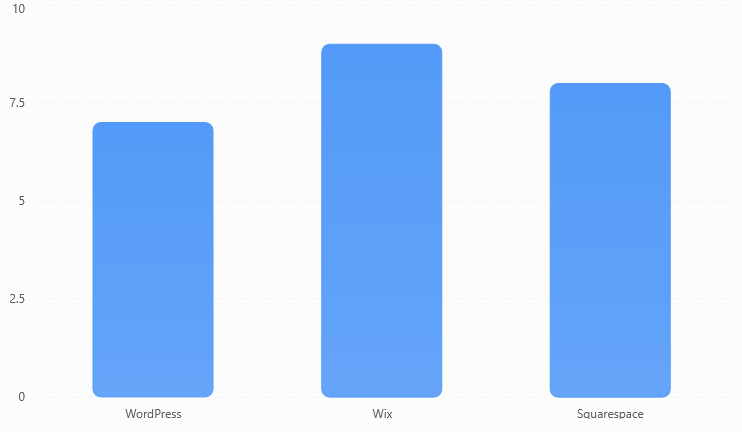
Chart interpretation: Website builders generally simplify routine management by combining editing, hosting, and platform updates. WordPress can also be straightforward to manage once configured properly, but plugin updates, backups, compatibility, and security may require extra attention.
Suggested chart caption: Estimated ease of routine website management.
8. Which Platform Is Better for E-Commerce?
If you plan to sell products online, consider payment methods, product management, shipping, inventory, and future expansion.
WordPress with WooCommerce supports product catalogs, payment integrations, shipping options, coupons, and many additional extensions. This makes it a flexible choice for businesses that need a customized online store.
Website builders also offer e-commerce tools on supported plans. They can be suitable for businesses that want to launch quickly and manage products through a simpler interface.
Choose WordPress with WooCommerce if you need extensive customization or specialized integrations. Consider a website builder if its built-in store features meet your needs and you prefer a more managed environment.
Before deciding, check transaction fees, payment gateway availability, shipping integrations, and whether the platform supports your target market.
9. Security and Website Maintenance
Every website needs basic security and maintenance, regardless of the platform.
With WordPress, you should keep the core software, themes, and plugins updated. Use strong passwords, reliable backups, HTTPS, reputable plugins, and appropriate security protections. Test major updates when possible.
Website builders manage much of the underlying platform infrastructure, reducing the number of technical tasks that the business owner handles directly. Nevertheless, you still need to protect your account, manage user permissions, and maintain safe website content and settings.
A well-maintained WordPress site can be secure and reliable. A website builder can also be secure, provided you follow good account security practices and the provider maintains its infrastructure.
10. How to Choose the Right Platform for Your Small Business
Use your business goals to guide the decision.
Choose WordPress if:
- You need custom website functionality.
- You want greater control over your hosting and website files.
- You plan to publish articles and invest in content marketing.
- You want to build a flexible WooCommerce store.
- You expect your website to expand over time.
- You have technical skills or can hire a developer for maintenance.
Choose a website builder if:
- You want to launch a simple website quickly.
- You prefer visual editing and guided setup.
- You do not want to manage hosting separately.
- Your business needs standard pages, forms, and basic marketing features.
- You are comfortable working within the platform’s available features and migration options.
For example, a freelance consultant who needs a homepage, service descriptions, testimonials, and a contact form may be comfortable with a website builder. A growing online store that needs custom product features and integrations may benefit more from WordPress.
11. Why Professional Website Development Can Help
Selecting a platform is only the first step. Your website also needs clear navigation, a mobile-friendly layout, useful content, fast-loading pages, and strong calls to action.
A poorly configured website can frustrate visitors even when it uses a powerful platform. Similarly, a simple website builder can produce an effective business website when it is designed around customer needs.
Professional WordPress website development can help businesses create customized pages, improve website performance, configure SEO tools, resolve plugin conflicts, and maintain a consistent brand identity.
Before hiring a developer, review relevant portfolio examples, confirm the project scope, discuss maintenance requirements, and agree on deliverables.
The choice between WordPress vs website builders depends on your business goals, technical confidence, budget, and plans for growth.
WordPress is a strong option for businesses that value customization, content publishing, e-commerce flexibility, and greater control over their website. Website builders are attractive for business owners who prioritize simplicity, guided setup, and managed hosting.
There is no universal winner. Start by listing the features you need today, the features you may need in the future, and the total cost of maintaining your website.
If your business needs a flexible website that can grow with your services, WordPress is worth serious consideration. If you need a straightforward online presence with minimal technical management, a website builder may be the better fit.
Need help choosing or improving your business website? A professional website review can help you identify design, speed, usability, and technical issues before they affect your customers. Choose the platform that supports your business—not the one with the longest feature list.